まえおき
- 以下のAdvent Calendarにおける24日目の記事です
発端
という訳で、書きました。
OCI Image とは
Open Container Initiativeによって定められた、コンテナイメージフォーマットの標準仕様です。
詳しくは Open Container Initiativeによるコンテナランタイムとコンテナイメージの最初の標準化作業が完了、「OCI v1.0」発表 - Publickey にて。
OCI Imageを触ってみる
現在、OCI ImageをdownloadできるDocker HubのようなWebサイトは知る限りありません。なので、自分でOCI Imageを作成する必要があります。
まずはDocker Imageから
まず、Docker Hubにて公開されているDocker imageをdownloadするところからです。以下のコマンドで、Docker Hubからダウンロードしたimageをtarballとして扱うことができるようになります。
$ docker image pull ruby:2.5.3-slim-stretch
$ docker save ruby:2.5.3-slim-stretch --output ruby_253_slim_stretch.tar
このtarを展開してみましょう。
$ tar -xf ruby_253_slim_stretch
すると、manifest.json というファイルができているので、見てみます。
[
  {
    "Config":"b1c1603e80c648f3ab902b0259ab846a7779d0780124bf9e417dd4b8c3cea296.json",
    "RepoTags":[
      "ruby:2.5.3-slim-stretch"
    ],
    "Layers":[
      "aeff88bcdbbd12ea45c023c45f97b870492092899651c811b2ef26ae7fdf3120/layer.tar",
      "c61a4dce9ddcebd63027d09811998052c9b2cdb3a379c297277cf755dfcf1420/layer.tar",
      "de2944e57fc93c2f354420cb36210fd1181687a990ffd7123600fdaecba3ee83/layer.tar",
      "49c3631e8651776127d66adb995e78af1e2cfc52b7a10a20df0d92d837258419/layer.tar",
      "eb50b8a8210f1b43ff1571598e66b694844b2dcf6fbaa0691e8af6b7c80dcaa7/layer.tar"
    ]
  }
]
なるほど、これはOCI image specを読むとわかるのですが、OCIに定められている形式のJSONではありませんね。
skopeo
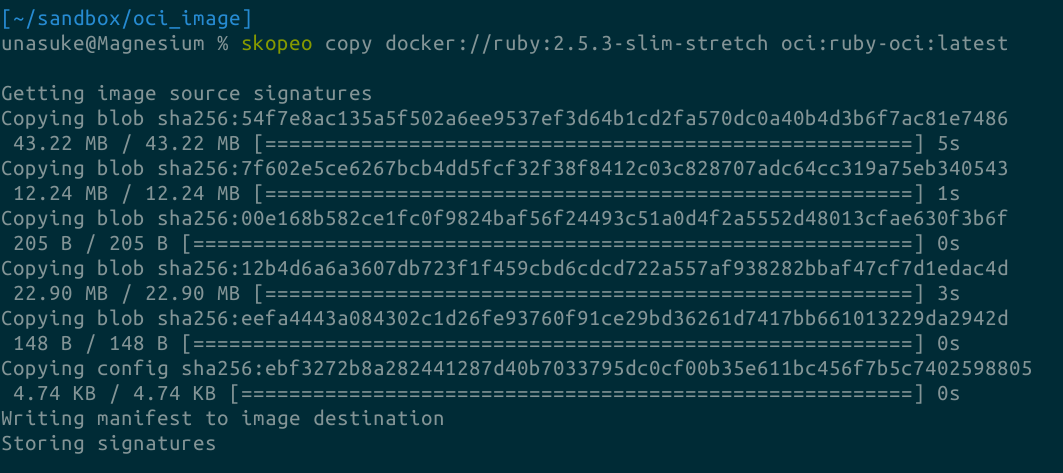
ここで、containers/skopeo というtoolを使用して、Docker imageをOCI imageに変換してみます。
$ skopeo copy docker://ruby:2.5.3-slim-stretch oci:ruby-oci:latest
すると、 ruby-oci/index.json というファイルができているので、見てみます。
{
  "schemaVersion":2,
  "manifests":[
    {
      "mediaType":"application/vnd.oci.image.manifest.v1+json",
      "digest":"sha256:a3843587af4f3e838f3e1a10649631144d4dcf4391980b64f3b902d81048057c",
      "size":976,
      "annotations":{
        "org.opencontainers.image.ref.name":"latest"
      },
      "platform":{
        "architecture":"amd64",
        "os":"linux"
      }
    }
  ]
}
なるほど、これは OCI Image Specに定められている image manifest fileですね。
以下、OCI Image Format Specification v1.0.1
自分なりに理解しようと翻訳したもののメモになります。
正確性の保証はないです。誤訳とかあります。最後のほう力尽きてます。
Open Container Initiative Image Format Specification v1.0.1
Overviewで語られていること
high level image manifest にはcontentsとdependencies of the image including the content-addressable(連想?) identity of one of more file system layer changeset archives、展開すると最終的に実行可能なファイルシステムになる
image configuration にはapplication arguments, environmentsなどの情報
image indexには high level manifest list of manifests and discriptorsのpointが含まれる
それらのmanifestsは異なるimageの実装 ←プラットフォームや他の属性によって変化することができる

一度作成されたOCI imageは名前によって探索(discovered)、ダウンロード、hashによる検証、署名による信頼、OCI Runtime Bundleへの展開ができる

Understanding the specification
components of the specは以下を含む
- Image Manifest
- container imageを作成するためのcomponentsをdocument describing(記載した書面)
- Image Index
- 注釈されたimage manifestsへのindex
- Image Layout
- contents of an imageのfilesystem layout
- Filesystem Layer
- containerのfilesystemのchangeset
- Image Configuration
- runtime bundle(OCI Runtime spec参照)へ変換可能なimage layerの順序及び構成を決定する
- Conversion
- どのようにしてこの翻訳が発生するかを示すもの(?)
- Discriptor
- type, metadata, 参照されたcontentのaddressへのreference
optional featureとしてSignaturesやNamingが仕様に含まれるかもしれない。
OCI Image Media Types
-
application/vnd.oci.descriptor.v1+json
-
application/vnd.oci.layout.header.v1+json
- OCI Layout (OCI Image Layout Specificationにて)
-
application/vnd.oci.image.index.v1+json
-
application/vnd.oci.image.manifest.v1+json
-
application/vnd.oci.image.config.v1+json
-
application/vnd.oci.image.layer.v1.tar
- Layerのtar archive
- gzip圧縮したものが
application/vnd.oci.image.layer.v1.tar+gzip
-
application/vnd.oci.image.layer.nondistributable.v1.tar
- 配布に制限のあるLayerのtar archive (制限とは?)
- gzip圧縮したものが
application/vnd.oci.image.layer.nondistributable.v1.tar+gzip
HTTP responseのContent-Typeで上の値を返すなどのように、typeを返すなにかしらの方法を実装してもよい(MAY)、また実装はmedia typeとdigestを期待してよい?
実装は返却されたmedia typeを尊重する必要がある(SHOULD)
Compatibility Matrix
前方・後方互換を可能な限り維持する必要がある。
似た、または関連するmedia typeは以下
-
application/vnd.oci.image.index.v1+json
-
application/vnd.docker.distribution.manifest.list.v2+json (mediaTypeが違う?)
-
application/vnd.oci.image.manifest.v1+json
application/vnd.docker.distribution.manifest.v2+json
-
application/vnd.oci.image.layer.v1.tar+gzip
-
application/vnd.docker.image.rootfs.diff.tar.gzip 互換性がある(入れ替え可能)
-
application/vnd.oci.image.config.v1+json
application/vnd.docker.container.image.v1+json
Relations
Image indexは複数のImage manifestを持つ。Image manifestとImage JSON(config)は1対1。Image manifestはLayerのtar archiveを複数持つ。
Discriptorは全ての参照を持つ。
OCI Content Discriptors
- OCI Imageは複数の様々なDAGなcomponentsによって構成される
- components間の参照は Content Descriptors を通じたグラフで表される
- Content Descriptors (簡潔にDiscriptorとも) 対象のcontentの配置を表す
- Content Descriptors はcontentのtype、identifier (digest)、 contentのサイズ (Byte) を含む。
- Discripterは外部contentへ安全に参照するために別形式として埋め込まれている必要がある(?)
- 別形式は外部contentへの安全な参照となるdiscriptorのために使用されなければならない(?)
properties
-
mediaType
- 文字列、必須。参照しているcontentのmedia typeを含む
-
digest
- 文字列、必須。対象となるcontentのdigest (後述)。
-
size
- int64、必須。対象となるcontentのByte size。このsizeと実際のcontentのsizeが違う場合にはcontentを信用してはならない。
-
urls
- 文字列の配列、OPTIONAL。objectをダウンロードすることができるURL。httpかhttps。
-
annotations
- 文字列と文字列のmap、OPTIONAL。後述するannotation ruleに従う必要がある。
-
data
Digests
こういう形式
sha256:6c3c624b58dbbcd3c0dd82b4c53f04194d1247c6eebdaab7c610cf7d66709b3bsha512:401b09eab3c013d4ca54922bb802bec8fd5318192b0a75f201d8b372742...
sha256とsha512がRegistered algorithmsとされている。sha256はMUSTでsha512はMAY。
Example
{
  "mediaType": "application/vnd.oci.image.manifest.v1+json",
  "size": 7682,
  "digest": "sha256:5b0bcabd1ed22e9fb1310cf6c2dec7cdef19f0ad69efa1f392e94a4333501270",
  "urls": ["https://example.com/example-manifest" ]
}
OCI Image Layout Specification
OCI Image LayoutはOCI content-addressable blobs と location-addressable references のための directory構造を表す(?)
Layoutではtarやzipなどのarchive formats、nfsなどの共有ファイルシステム、http、ftp、rsyncなどのネットワークによるファイル取得を使用してもよい。
あるimage layoutと参照は、manifestと指定された順序で適用されるfilesystem layerとOCI runtime specificationのconfig.jsonへ変換できるimage configurationがあればOCI Runtime Specification bundleを何らかのtoolによって作成できる。(?)
Content
-
blobs directory
- blobを含んでいる
- blobはschemaを持たず、“be considered opaque” である必要がある
- directoryは存在していなければならず、そして空でもよい。
-
oci-layout file
- 必須、JSONで、
imageLayoutVersion というfieldを持つ必要がある。
-
index.json
- 必須、image index JSONである必要がある。
Example
$ cd example.com/app/
$ find . -type f
./index.json
./oci-layout
./blobs/sha256/3588d02542238316759cbf24502f4344ffcc8a60c803870022f335d1390c13b4
./blobs/sha256/4b0bc1c4050b03c95ef2a8e36e25feac42fd31283e8c30b3ee5df6b043155d3c
./blobs/sha256/7968321274dc6b6171697c33df7815310468e694ac5be0ec03ff053bb135e768

$ shasum -a 256 ./blobs/sha256/afff3924849e458c5ef237db5f89539274d5e609db5db935ed3959c90f1f2d51
afff3924849e458c5ef237db5f89539274d5e609db5db935ed3959c90f1f2d51 ./blobs/sha256/afff3924849e458c5ef237db5f89539274d5e609db5db935ed3959c90f1f2d51
Blobs
-
blobs のサブディレクトリ以下にあるディレクトリは、各ハッシュアルゴリズムごとにまとめられている。そのディレクトリ以下に、実際のファイルが格納されている。
blobs/<alg>/<encoded>- 上記のblobは discriptorにおける
<alg>:<encoded> と対応している
Example
$ cat ./blobs/sha256/9b97579de92b1c195b85bb42a11011378ee549b02d7fe9c17bf2a6b35d5cb079 | jq
{
  "schemaVersion": 2,
  "manifests": [
    {
      "mediaType": "application/vnd.oci.image.manifest.v1+json",
      "size": 7143,
      "digest": "sha256:afff3924849e458c5ef237db5f89539274d5e609db5db935ed3959c90f1f2d51",
      "platform": {
        "architecture": "ppc64le",
        "os": "linux"
      }
    },
...
$ cat ./blobs/sha256/afff3924849e458c5ef237db5f89539274d5e609db5db935ed3959c90f1f2d51 | jq
{
  "schemaVersion": 2,
  "config": {
    "mediaType": "application/vnd.oci.image.config.v1+json",
    "size": 7023,
    "digest": "sha256:5b0bcabd1ed22e9fb1310cf6c2dec7cdef19f0ad69efa1f392e94a4333501270"
  },
  "layers": [
    {
      "mediaType": "application/vnd.oci.image.layer.v1.tar+gzip",
      "size": 32654,
      "digest": "sha256:9834876dcfb05cb167a5c24953eba58c4ac89b1adf57f28f2f9d09af107ee8f0"
    },
...
$ cat ./blobs/sha256/5b0bcabd1ed22e9fb1310cf6c2dec7cdef19f0ad69efa1f392e94a4333501270 | jq
{
  "architecture": "amd64",
  "author": "Alyssa P. Hacker <alyspdev@example.com>",
  "config": {
    "Hostname": "8dfe43d80430",
    "Domainname": "",
    "User": "",
    "AttachStdin": false,
    "AttachStdout": false,
    "AttachStderr": false,
    "Tty": false,
    "OpenStdin": false,
    "StdinOnce": false,
    "Env": [
      "PATH=/usr/local/sbin:/usr/local/bin:/usr/sbin:/usr/bin:/sbin:/bin"
    ],
    "Cmd": null,
    "Image": "sha256:6986ae504bbf843512d680cc959484452034965db15f75ee8bdd1b107f61500b",
...
$ cat ./blobs/sha256/9834876dcfb05cb167a5c24953eba58c4ac89b1adf57f28f2f9d09af107ee8f0
[gzipped tar stream]
oci-layout file
これ。
{
    "imageLayoutVersion": "1.0.0"
}
index.json
必須。image-layoutの参照、descriptorsのentry pointになる。/index.json に置かれる。
"org.opencontainers.image.ref.name" にイメージのtagが格納される?
{
  "schemaVersion": 2,
  "manifests": [
    {
      "mediaType": "application/vnd.oci.image.index.v1+json",
      "size": 7143,
      "digest": "sha256:0228f90e926ba6b96e4f39cf294b2586d38fbb5a1e385c05cd1ee40ea54fe7fd",
      "annotations": {
        "org.opencontainers.image.ref.name": "stable-release"
      }
    },
    {
      "mediaType": "application/vnd.oci.image.manifest.v1+json",
      "size": 7143,
      "digest": "sha256:e692418e4cbaf90ca69d05a66403747baa33ee08806650b51fab815ad7fc331f",
      "platform": {
        "architecture": "ppc64le",
        "os": "linux"
      },
      "annotations": {
        "org.opencontainers.image.ref.name": "v1.0"
      }
    },
    {
      "mediaType": "application/xml",
      "size": 7143,
      "digest": "sha256:b3d63d132d21c3ff4c35a061adf23cf43da8ae054247e32faa95494d904a007e",
      "annotations": {
        "org.freedesktop.specifications.metainfo.version": "1.0",
        "org.freedesktop.specifications.metainfo.type": "AppStream"
      }
    }
  ],
  "annotations": {
    "com.example.index.revision": "r124356"
  }
}
OCI Image Manifest Specification
imageと、そのコンポーネントのために生成された一意なIDからハッシュ可能なimageのconfigurationimage modelをサポートした参照可能なimageを作成すること、platform固有のmanifestを含んだ”fat manifest”による複数architecture対応のimageの実現、OCI Runtime Specificationへの変換の3つを目標にしている。
Image Manifest
image indexはarchitectureやOSごとに展開可能なそれぞれのimageの情報を持つが、image manifestは特定のarchitecture、OSに対する単一のcontainer imageにおけるconfigurationとlayerの集合を提供する。
Image Manifest Property Descriptions
-
schemaVersion
- lint、必須。2でないといけない?そして将来的には削除されるかもしれない。
-
mediaType
-
config
-
layers
- objectの配列。各objectはdescriptorである必要がある。base layerが先頭になければならない。
- 以降の要素はstack順に並んでいなければならない。
- 最終のfilesystem layerは空のディレクトリにapplying(後述)した結果でないといけない?
- 所有者やmode、その他のattributesはinitial empty dirに対しては提供されない。
-
annotations
Example
{
  "schemaVersion": 2,
  "config": {
    "mediaType": "application/vnd.oci.image.config.v1+json",
    "size": 7023,
    "digest": "sha256:b5b2b2c507a0944348e0303114d8d93aaaa081732b86451d9bce1f432a537bc7"
  },
  "layers": [
    {
      "mediaType": "application/vnd.oci.image.layer.v1.tar+gzip",
      "size": 32654,
      "digest": "sha256:9834876dcfb05cb167a5c24953eba58c4ac89b1adf57f28f2f9d09af107ee8f0"
    },
    {
      "mediaType": "application/vnd.oci.image.layer.v1.tar+gzip",
      "size": 16724,
      "digest": "sha256:3c3a4604a545cdc127456d94e421cd355bca5b528f4a9c1905b15da2eb4a4c6b"
    },
    {
      "mediaType": "application/vnd.oci.image.layer.v1.tar+gzip",
      "size": 73109,
      "digest": "sha256:ec4b8955958665577945c89419d1af06b5f7636b4ac3da7f12184802ad867736"
    }
  ],
    "annotations": {
    "com.example.key1": "value1",
    "com.example.key2": "value2"
  }
}
OCI Image Index Specification
Image Index Property Descriptions
- schemaVersion
- int、必須。現在は2。今後変更されることはないし、なんら廃止されるかもしれない。
- mediaType
- manifests
- objectの配列。必須。空配列でも良い。各objectはdescriptorのプロパティを供えている。
- mediaType
-
application/vnd.oci.image.manifest.v1+json ← これ
- platform
- optional。imageを動作させるための最低限のruntimeにおける必須要件を表す。
- architecture
- 必須。CPUアーキテクチャ。GOARCHと同じ値が入る。
- os
- 必須。architectureと同様GOOSと同じ値が入る。
- os.version
- os.features
- 文字列の配列。optional。osがwindowsの場合には後述の値を解釈する必要がある。
- variant
- optional。文字列。CPUのvariantを持つ。
- features
- annotations
Example
{
  "schemaVersion": 2,
  "manifests": [
    {
      "mediaType": "application/vnd.oci.image.manifest.v1+json",
      "size": 7143,
      "digest": "sha256:e692418e4cbaf90ca69d05a66403747baa33ee08806650b51fab815ad7fc331f",
      "platform": {
        "architecture": "ppc64le",
        "os": "linux"
      }
    },
    {
      "mediaType": "application/vnd.oci.image.manifest.v1+json",
      "size": 7682,
      "digest": "sha256:5b0bcabd1ed22e9fb1310cf6c2dec7cdef19f0ad69efa1f392e94a4333501270",
      "platform": {
        "architecture": "amd64",
        "os": "linux"
      }
    }
  ],
  "annotations": {
    "com.example.key1": "value1",
    "com.example.key2": "value2"
  }
}
Image Layer Filesystem Changeset
- どのようにfilesystemや、layer間の変更をシリアライズするかについての仕様
-
application/vnd.oci.image.layer.v1.tar はtar archiveでなくてはならず、またtar archiveの結果となるpathに重複したエントリを含んではいけない
change types
- 以下3種類
- Additions
- Modifications
- Removals
file types
- 以下7種類
- regular files
- directories
- sockets
- symbolic links
- block devices
- character devices
- FIFOs
File attributes
- 以下7種類
- modifitation time (mtime)
- user id (uid)
- group id (gid)
- mode (mode)
- extend attributes (xattrs)
- symlink reference (linkname + symbolic link type)
- hardlink reference (linkname)
- Sparse file はtarで扱えないため使ってはいけない
hardlinks
- hardlinkはPOSIXのコンセプトにある、同じデバイス上にある同じファイル1つ以上のディレクトリエントリ???
Platform-specific attributes
- Windows
- https://docs.microsoft.com/ja-jp/windows/desktop/FileIO/file-attribute-constants
Createing
- Initial Root Filesystem
- ベースになるやつ
- 空のdirectoryとして初期状態を持つ
- 名前はなんでもよい
rootfs-c9d-v1/
    etc/
        my-app-config
    bin/
        my-app-binary
        my-app-tools
色々とfilesystemについての解説が続く
Non-Distributable Layers
- Due to legal requirements, certain layers may not be regularly distributable.
-
application/vnd.oci.image.layer.nondistributable.v1.tar というmediaTypeでないといけない
- 実装はこのlayerをuploadしてはいけない
OCI Image Configuration
- OCI image は順序付きのfilesystemの変更とcontainer runtimeが仕様する、実行パラメータを持つ
application/vnd.oci.image.config.v1+json
用語
- Layer
- 複数のlayerから成るimage filesystem
- 各layerはtarを元にしたlayer formatでまとめられたfilesystemの変更(added, changed, deleted, 親layerへの関連)の集合を表現する。
- layerは環境変数やデフォルト引数などのconfiguration metadataを持たない。
- Union fsやAUFSなどを使用することで普通のfilesystemのように使用できる
- Image JSON
- 各imageは関連付けられたJSON structureを持つ。
- 作成日時、作者、entrypointやデフォルト引数やnetworkなどのruntime configurationを格納する。
- JSON structureは各layerの(暗号学的ハッシュ関数によって計算した)ハッシュ値、歴史的情報を持つ
- JSONはimmutableである。
- JSONの変更は派生となる新規image作成を意味する
- Layer DiffID
- layerの未圧縮なtar archiveに対するhash digest (discriptorに書いてあるやつ)
sha256:a9561eb1b190625c9adb5a9513e72c4dedafc1cb2d4c5236c9a6957ec7dfd5a9
- layerはDiffIDの変更なしに圧縮、展開できなければならない。
- Layer ChainID
- 単一の識別子によるlayer スタック参照への参照があると便利
- DiffIDは単一のchangesetを識別するが、ChainIDはそれらchangesaetsを適用したものへの識別子
- 定義としては以下
ChainID(L₀) = DiffID(L₀)ChainID(L₀|...|Lₙ₋₁|Lₙ) = Digest(ChainID(L₀|...|Lₙ₋₁) + " " + DiffID(Lₙ))
- ImageID
- imageのconfigration JSONのsha256
properties
- created
- optional、文字列。RFC 3339, section 5.6.によって定められた書式によるimageの作成日時
- auther
- optional。文字列。imageの作者またはメンテナの名前もしくはemail address
- architecture
- 文字列、必須。CPU architecture。GOARCH
- os
- config
- object、optional。imageから成るcontainerの実行パラメータの元として使用される
- container作成時に実行パラメータが与えられる場合にはnullにできる
- User
- 文字列、optional。processを実行するときに使用する、platform固有のusernameかUID
- ExposedPorts
- object、optional。コンテナ実行時にexposeするportの集合。プロトコルを明示しない場合にはtcpが使用される。
- Env
- 文字列の配列、optional。
VARNAME=VARVALUE という形式で格納される。
- (Envって書かれてるけどコンテナの環境変数として使用されるとは明記されてないように見える……)
- Entrypoint
- 文字列の配列、optional。container開始時に実行コマンドとして使用される引数の配列。
- containerが作成されたときに指定された場合上書かれる
- Cmd
- 文字列の配列。optional。containerのentrypointに使用されるデフォルトの引数。
- containerが作成されたときに指定された場合上書かれる
- Entrypointが与えられなかった場合、この配列の最初の要素が実行可能である必要がある
- Volumes
- プロセスがコンテナインスタンスに固有のデータを書き込む可能性がある場所を記述するディレクトリのセット。(google translate)
- WorkingDir
- 文字列、optional。containerのentrypointが動作するdirectory
- Labels
- object、optional。containerのmetadata
- StopSignal
- 文字列、optional。containerが終了するときに送信されるsystem call signal。SIGKILLやSIGTMIN+3など
- rootfs
- object、必須。imageが使用するlayerのcontentへのaddressへの参照
- type
- 文字列、必須。
layers である必要がある。実装は不明な値が入っていた場合はエラーを出す必要がある。
- diff_ids
- 文字列の配列、必須。layer content hashes (DiffIDs)、順序付けされている
- history
- objectの配列、optional。各layerの歴史を以下のpropertyで持つ。
- created
- 文字列、optional。RFC 3339, section 5.6.によって定められた書式によるlayerの作成日時。
- auther
- created_by
- 文字列、optional。このlayerが何のコマンドによって作成されたかを持つ
- comment
- empty_layer
- boolean、optional。そのlayerがfilesystem的には何のdiffも持たない場合にtrueとなる(DockerfileのENVなどがそう)
- これ以外のfieldにおいては実装依存となる。実装がそれを解釈できない場合は無視する必要がある。
- 空白はoptionalだが実装はJSONを小さくするために空白を含めないようにしてもよい。
Example
{
    "created": "2015-10-31T22:22:56.015925234Z",
    "author": "Alyssa P. Hacker <alyspdev@example.com>",
    "architecture": "amd64",
    "os": "linux",
    "config": {
        "User": "alice",
        "ExposedPorts": {
            "8080/tcp": {}
        },
        "Env": [
            "PATH=/usr/local/sbin:/usr/local/bin:/usr/sbin:/usr/bin:/sbin:/bin",
            "FOO=oci_is_a",
            "BAR=well_written_spec"
        ],
        "Entrypoint": [
            "/bin/my-app-binary"
        ],
        "Cmd": [
            "--foreground",
            "--config",
            "/etc/my-app.d/default.cfg"
        ],
        "Volumes": {
            "/var/job-result-data": {},
            "/var/log/my-app-logs": {}
        },
        "WorkingDir": "/home/alice",
        "Labels": {
            "com.example.project.git.url": "https://example.com/project.git",
            "com.example.project.git.commit": "45a939b2999782a3f005621a8d0f29aa387e1d6b"
        }
    },
    "rootfs": {
      "diff_ids": [
        "sha256:c6f988f4874bb0add23a778f753c65efe992244e148a1d2ec2a8b664fb66bbd1",
        "sha256:5f70bf18a086007016e948b04aed3b82103a36bea41755b6cddfaf10ace3c6ef"
      ],
      "type": "layers"
    },
    "history": [
      {
        "created": "2015-10-31T22:22:54.690851953Z",
        "created_by": "/bin/sh -c #(nop) ADD file:a3bc1e842b69636f9df5256c49c5374fb4eef1e281fe3f282c65fb853ee171c5 in /"
      },
      {
        "created": "2015-10-31T22:22:55.613815829Z",
        "created_by": "/bin/sh -c #(nop) CMD [\"sh\"]",
        "empty_layer": true
      }
    ]
}
Annotations
- image manifestsやdiscriptorで使用されるannotationについて
Rules
- key-velueのmapである必要があり、keyもvalueも文字列である必要がある
- valueは必須だが、空文字列でもよい
- keyはmapの中で一意である必要がある
- namespaceとして使用するのがベストプラクティス
- keyはreverse domain notationである必要がある
- prefix
org.opencontainers はOCIによって予約済みなので使用してはならない。
- key
org.opencontainers.image はOCIによって予約済みなので使用してはならない。(他のOCI仕様についても同様)
- Annotationが無い場合はempty mapかそもそもプロパティとして与えてはならない
- 不明なkeyを検出してもconsumerはエラーを発してはならない
Pre-Defined Annotation Keys
-
org.opencontainers.image.created
- RFC 3339によって定めされた書式によって表されるimageが作成された日時
- RFC 3339, section 5.6ではないのか?
-
org.opencontainers.image.authors
- imageについて連絡できる人または組織への連絡先(freeform)
-
org.opencontainers.image.url
- imageについての詳細な情報が得られるページへのURL (string)
-
org.opencontainers.image.documentation
- imageへのdocumentationが得られるURL (string)
-
org.opencontainers.image.source
- imageをbuildするためのソースコードへのURL (string)
-
org.opencontainers.image.version
- packaged softwareのversion (semantic versioningになっている必要がある)
-
org.opencontainers.image.revision
- packaged softwareのSVCにおけるrevision
-
org.opencontainers.image.vendor
-
org.opencontainers.image.licenses
- contained softwareのライセンス (SPDX)
-
org.opencontainers.image.ref.name
- Name of the reference for a target (?)
- なんだろう……?
-
org.opencontainers.image.title
-
org.opencontainers.image.description
- human-readableなimage内のpackaged softwareの説明
Back-compatibility with Label Schema
- http://label-schema.org/rc1/ で定められている従来のcontainer imageへのlabelは現在はorg.opencontainers.imageへ置き替えられる
- 互換性の表については以下
| org.opencontainers.image | org.label-schema | Compatibility notes |
|—————————|———————––|———————|
| created | build-date | Compatible |
| url | url | Compatible |
| source | vcs-url | Compatible |
| version | version | Compatible |
| revision | vcs-ref | Compatible |
| vendor | vendor | Compatible |
| title | name | Compatible |
| description | description | Compatible |
| documentation | usage | URLの場合にはCompatible |
| authors | | Label Schemaにはない要素 |
| licenses | | Label Schemaにはない要素 |
| ref.name | | Label Schemaにはない要素 |
| | schema-version| OCI Image Specにはない要素 |
| | docker.*, rkt.* | OCI Image Specにはない要素 |
Conversion to OCI Runtime Configuration
- OCI imageをOCI runtime bundleに展開する場合、2つの直交するcomponentsの関連は以下の通り
- root filesystemの展開はfilesystem layserの集合から
- image configutarion blobはOCI Runtime consfiguration blobへ変換できる
- この章では
application/vnd.oci.image.config.v1+json を OCI Runtime configuration blobに変換する方法を定義する
- 前者の展開されたcomponentはlayerで定義されていて、configuration of runtime bundleとは直交する
- runtime configurationのpropertiesにおいて、この章で説明されないものは実装依存のもの
- converterはOCI runtime configurationを生成する際に、このドキュメントに記載されているようにOCI image configurationを頼りにしなければならない。
Verbatim Fields
- 特定のimage configuration fieldはそのままruntime configurationに変換できる
-
Config.WorkingDir → process.cwd
-
Config.Env → process.env ※1
-
Config.Entrypoint → process.args ※2
-
Config.Cmd → process.args ※2
- ※1 converterは値を追加してもよいが、既にEnvに存在する名前で追加してはいけない
- ※2 EntrypointとCmdの両方が指定された場合、converterはCmdの値をEntrypointに追加して、それをprocess.argsに指定しなければならない
annotation fields
- author → annotations ※1, 2
- created → annotations ※1, 3
- Config.Labels → annotations
- Config.StopSignal → annoations ※1, 4
- ※1 Config.Labelsで指定された場合、converterはその値を優先して使用する必要がある
- ※2 annotation内の
org.opencontainers.image.author に指定する必要がある
- ※3 annotation内の
org.opencontainers.image.created に指定する必要がある
- ※4 annotation内の
org.opencontainers.image.stopSignal に指定する必要がある
Parsed Fields
- 変換したうえで格納される値
-
Config.User → process.user.*
- Config.Userが数値(uidやgid)の場合、 process.user.uid や process.user.gid にコピーされなければならない
- Config.Userが数値でない場合、converterはcontainerのコンテキストによって解決されるuser情報を使用しなければならない
- Unix likeなsystemではNSSまたは
/etc/passwd をパースすることによってprocess.user.uid や process.user.gid に値を格納する
- Config.Userが指定されない場合、process.userがどうなるかは実装依存となる
- Config.Userがcontainerのコンテキストで解釈できなかった場合、converterはエラーを発する必要がある
Optional Fields
-
Config.ExposedPorts → annotations ※1
-
Config.Vlumes → mounts ※2
- ※1 runtime configurationには対応するフィールドはないが、converterは
org.opencontainers.image.exposedPorts に値をセットしなければならない
- ※2 実装は指定された場所にmoutsを提供する必要がある
Annotations
- 3つの方法でOCI Imageをannotationできる
- Config.Labels in the configuration of the image
- annotations in the manifest of the image
- annotations in the image index of the image
- converterはannotationが与えられた場合にこの値を変更してはいけない
Considerations
Extensibility
- 実装はmanifestsやimage indexを読み込み、または処理する場合に未知のpropertyがあってもエラーを発してはならない
Canonicalization
- OCI Imagesは参照可能である disctiptorを参照のこと。
- 参照可能であることの利点は、複製が用意であるということ
- 多くのimageはlayerから成るが、それらはstoreからは単一のblobとして提供される
JSON
- JSONによるcontentは http://wiki.laptop.org/go/Canonical_JSON としてserializedできなければならない
Extended Backus-Naur Form
 ※ Rails アプリのテストではなく、Rails本体のテストについての話です。